Documentation Index
Fetch the complete documentation index at: https://walletconnect-pay-docs-tomiir-buyer-checkout-docs.mintlify.app/llms.txt
Use this file to discover all available pages before exploring further.
This documentation covers integrating WalletConnect Pay through WalletKit. This approach provides a unified API where Pay is automatically configured when you configure WalletKit, simplifying the integration for wallet developers.
Using AI for Integration? If you’re using an AI IDE or assistant to help with integration, you can provide it with our comprehensive AI integration prompt for better context and guidance.
Requirements
- iOS 13.0+
- Swift 5.7+
- Xcode 14.0+
- WalletKit (ReownWalletKit)
Pre-Requisites
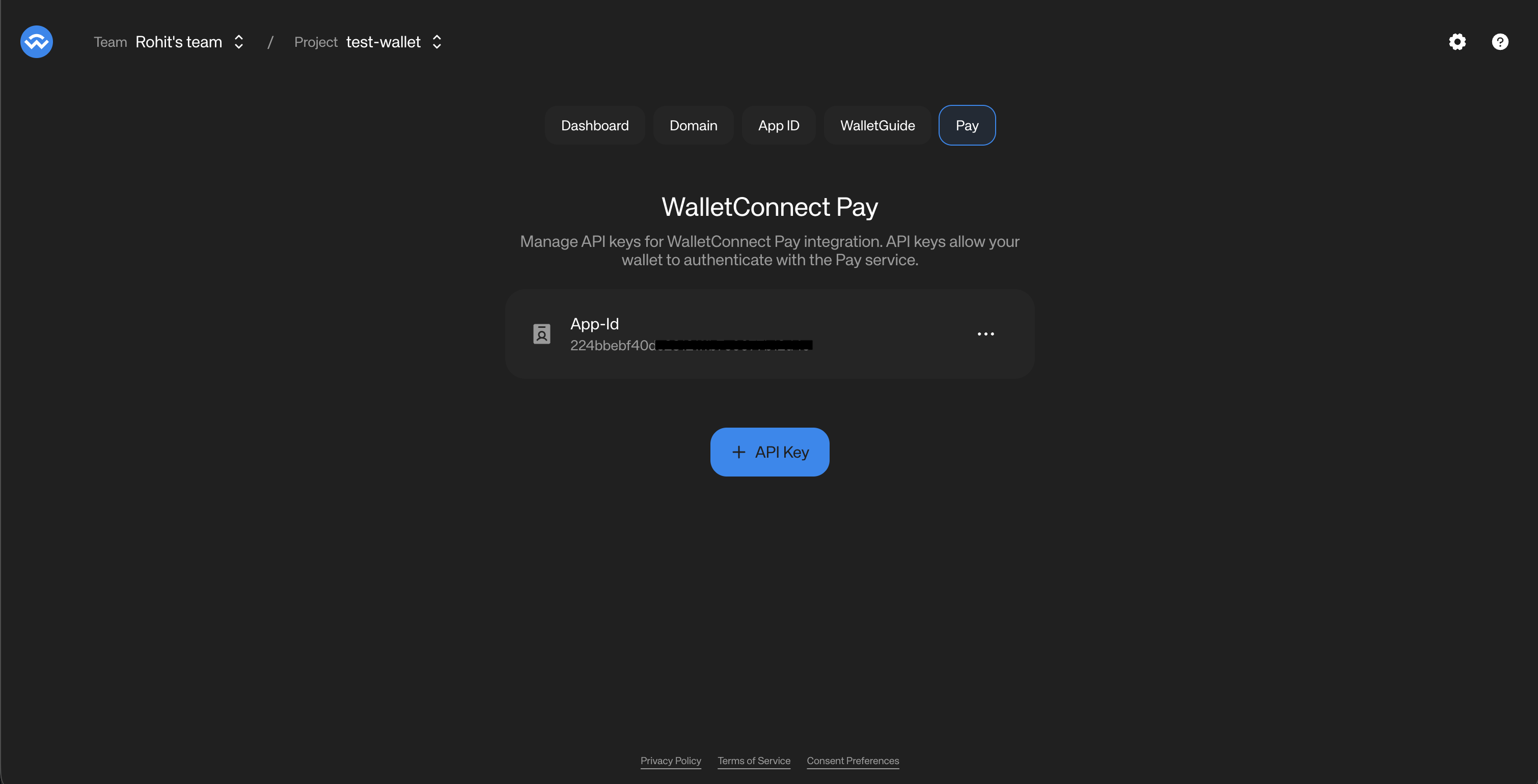
In order to use your WalletConnect Pay, you need to obtain an App ID for your project from the WalletConnect Dashboard.
How to obtain an App ID
- Navigate to the WalletConnect Dashboard.
- Select the project that is associated with your wallet (as in, the projectId that is being used for your wallet’s WalletConnect integration).
- Click on the “Get Started” button to get an App ID associated with your project.
- The Dashboard will now show the App ID associated with your project.
- Click on the three dots on the right of the App ID and select “Copy App ID”. You will be using this for your wallet’s WalletConnect Pay integration.
Installation
Swift Package Manager
Add ReownWalletKit to your Package.swift:
dependencies: [
.package(url: "https://github.com/reown-com/reown-swift", from: "1.0.0")
]
Then add ReownWalletKit to your target dependencies:
.target(
name: "YourApp",
dependencies: ["ReownWalletKit"]
)
WalletConnectPay is automatically included as a dependency of WalletKit.
Configuration
When using WalletKit, Pay is automatically configured using your project’s Networking.projectId. No separate configuration is needed.
import ReownWalletKit
func application(_ application: UIApplication, didFinishLaunchingWithOptions...) {
// Configure WalletKit - Pay is automatically configured
WalletKit.configure(
metadata: AppMetadata(
name: "My Wallet",
description: "A crypto wallet",
url: "https://mywallet.com",
icons: ["https://mywallet.com/icon.png"]
),
crypto: DefaultCryptoProvider(),
payLogging: true // Enable Pay debug logging
)
}
Payment Link Detection
Use the static isPaymentLink method to detect payment links before processing:
// Static method - can be called before configure()
if WalletKit.isPaymentLink(scannedString) {
startPaymentFlow(paymentLink: scannedString)
}
// Or via the instance
if WalletKit.instance.Pay.isPaymentLink(scannedString) {
startPaymentFlow(paymentLink: scannedString)
}
The isPaymentLink utility method detects WalletConnect Pay links by checking for:
pay. hosts (e.g., pay.walletconnect.com)
pay= parameter in WalletConnect URIs
pay_ prefix in bare payment IDs
Payment Flow
The payment flow consists of five main steps:
Detect Payment Link -> Get Options -> Get Actions -> Sign Actions -> Confirm Payment
Get Payment Options
When a user scans a payment QR code or opens a payment link, fetch available payment options:// 1. Get payment options
let options = try await WalletKit.instance.Pay.getPaymentOptions(
paymentLink: paymentLink,
accounts: ["eip155:1:\(address)", "eip155:137:\(address)"]
)
// Display merchant info
if let info = options.info {
print("Merchant: \(info.merchant.name)")
print("Amount: \(info.amount.display.assetSymbol) \(info.amount.value)")
}
// Show available payment options to user
for option in options.options {
print("Pay with \(option.amount.display.assetSymbol) on \(option.amount.display.networkName ?? "Unknown")")
}
// Check which options require data collection
for option in options.options {
if option.collectData != nil {
print("Option \(option.id) requires info capture")
}
}
Get Required Actions
After the user selects a payment option, get the signing actions:// 2. Get required actions for selected option
let actions = try await WalletKit.instance.Pay.getRequiredPaymentActions(
paymentId: options.paymentId,
optionId: selectedOption.id
)
Sign Actions
Each action contains a walletRpc with EIP-712 typed data that needs to be signed:// 3. Sign each action and collect signatures
var signatures: [String] = []
for action in actions {
let signature = try await sign(action.walletRpc)
signatures.append(signature)
}
Signing Implementation
private func signTypedData(
action: Action,
walletAddress: String,
signer: YourSignerProtocol
) async throws -> String {
let rpc = action.walletRpc
// Parse params: ["address", "typedDataJson"]
guard let paramsData = rpc.params.data(using: .utf8),
let params = try JSONSerialization.jsonObject(with: paramsData) as? [Any],
params.count >= 2,
let typedDataJson = params[1] as? String else {
throw PaymentError.invalidParams
}
return try await signer.signTypedData(
data: typedDataJson,
address: walletAddress
)
}
Signatures must be in the same order as the actions array.
Collect User Data (If Required)
If the selected option has collectData set, you must collect user information before confirming:WebView-Based Data Collection
When a payment requires user information (e.g., for Travel Rule compliance), the SDK returns a collectData field on individual payment options. Each option may independently require data collection — some options may require it while others don’t.Recommended Flow (Per-Option)
The recommended approach is to display all payment options upfront, then handle data collection only when the user selects an option that requires it:
- Call
getPaymentOptions and display all available options to the user
- Show a visual indicator (e.g., “Info required” badge) on options where
option.collectData is present
- When the user selects an option, check
selectedOption.collectData
- If present, open
selectedOption.collectData.url in a WebView within your wallet
- Optionally append a
prefill=<base64-json> query parameter with known user data (e.g., name, date of birth, address). Use proper URL building to handle existing query parameters.
- Listen for JS bridge messages:
IC_COMPLETE (success) or IC_ERROR (failure)
- On
IC_COMPLETE, proceed to confirmPayment() without passing collectedData — the WebView submits data directly to the backend
Decision Matrix
Response collectData | option.collectData | Behavior |
|---|
| present | present | Option requires IC — use option.collectData.url |
| present | null | Option does NOT require IC (others might) — skip IC for this option |
null | null | No IC needed for any option |
The collectData also includes a schema field — a JSON schema string describing the required fields. The required list in this schema tells you which fields the form expects. Wallets can use these field names as keys when building the prefill JSON object. For example, if the schema’s required array contains ["fullName", "dob", "pobAddress"], you can prefill with {"fullName": "...", "dob": "...", "pobAddress": "..."}.
The top-level collectData on the payment options response is still available for backward compatibility. However, the per-option collectData is the recommended approach as it provides more granular control over the flow.
When using the WebView approach, do not pass collectedData to confirmPayment(). The WebView handles data submission directly.
// Check per-option data collection requirement after user selects an option
if let collectData = selectedOption.collectData, let url = collectData.url {
// Use the "required" list from collectData.schema to determine which fields to prefill
let prefillData: [String: String] = [
"fullName": "John Doe",
"dob": "1990-01-15",
"pobAddress": "123 Main St, New York, NY 10001"
]
let jsonData = try JSONSerialization.data(withJSONObject: prefillData)
let prefillBase64 = jsonData.base64EncodedString()
var components = URLComponents(string: url)!
var queryItems = components.queryItems ?? []
queryItems.append(URLQueryItem(name: "prefill", value: prefillBase64))
components.queryItems = queryItems
let webViewUrl = components.string!
// Show WebView for this specific option and wait for IC_COMPLETE message
showWebView(url: webViewUrl)
}
WebView Message Types
The WebView communicates with your wallet through JavaScript bridge messages. The message payload is a JSON string with the following structure:| Message Type | Payload | Description |
|---|
IC_COMPLETE | { "type": "IC_COMPLETE", "success": true } | User completed the form successfully. Proceed to payment confirmation. |
IC_ERROR | { "type": "IC_ERROR", "error": "..." } | An error occurred. Display the error message and allow the user to retry. |
| Platform | Bridge Name | Handler |
|---|
| Kotlin (Android) | AndroidWallet | @JavascriptInterface onDataCollectionComplete(json: String) |
| Swift (iOS) | payDataCollectionComplete | WKScriptMessageHandler.didReceive(message:) |
| Flutter | ReactNativeWebView (injected via JS bridge) | JavaScriptChannel.onMessageReceived |
| React Native | ReactNativeWebView (native) | WebView.onMessage prop |
Confirm Payment
Submit the signatures and collected data to complete the payment:// 4. Confirm payment
let result = try await WalletKit.instance.Pay.confirmPayment(
paymentId: options.paymentId,
optionId: selectedOption.id,
signatures: signatures,
collectedData: collectedData
)
switch result.status {
case .succeeded:
print("Payment successful!")
case .processing:
print("Payment is being processed...")
case .failed:
print("Payment failed")
case .expired:
print("Payment expired")
case .requiresAction:
print("Additional action required")
}
WebView Implementation
When a selected option has collectData.url present, display the URL in a WKWebView. The WebView handles form rendering, validation, and T&C acceptance.
import WebKit
import SwiftUI
struct PayDataCollectionWebView: UIViewRepresentable {
let url: URL
let onComplete: () -> Void
let onError: (String) -> Void
func makeCoordinator() -> Coordinator {
Coordinator(onComplete: onComplete, onError: onError)
}
func makeUIView(context: Context) -> WKWebView {
let config = WKWebViewConfiguration()
config.userContentController.add(
context.coordinator,
name: "payDataCollectionComplete"
)
let webView = WKWebView(frame: .zero, configuration: config)
webView.navigationDelegate = context.coordinator
webView.load(URLRequest(url: url))
return webView
}
func updateUIView(_ uiView: WKWebView, context: Context) {}
class Coordinator: NSObject, WKScriptMessageHandler, WKNavigationDelegate {
let onComplete: () -> Void
let onError: (String) -> Void
init(onComplete: @escaping () -> Void, onError: @escaping (String) -> Void) {
self.onComplete = onComplete
self.onError = onError
}
func userContentController(
_ userContentController: WKUserContentController,
didReceive message: WKScriptMessage
) {
guard let body = message.body as? String,
let data = body.data(using: .utf8),
let json = try? JSONSerialization.jsonObject(with: data) as? [String: Any],
let type = json["type"] as? String else { return }
DispatchQueue.main.async {
switch type {
case "IC_COMPLETE":
self.onComplete()
case "IC_ERROR":
let error = json["error"] as? String ?? "Unknown error"
self.onError(error)
default:
break
}
}
}
func webView(
_ webView: WKWebView,
decidePolicyFor navigationAction: WKNavigationAction,
decisionHandler: @escaping (WKNavigationActionPolicy) -> Void
) {
guard let url = navigationAction.request.url else {
decisionHandler(.allow)
return
}
if let host = url.host, !host.contains("pay.walletconnect.com") {
UIApplication.shared.open(url)
decisionHandler(.cancel)
return
}
decisionHandler(.allow)
}
}
}
Complete Example
Here’s a complete implementation using WalletKit:
import ReownWalletKit
class PaymentManager {
func processPayment(
paymentLink: String,
walletAddress: String,
signer: YourSignerProtocol
) async throws {
// 1. Get payment options
let accounts = [
"eip155:1:\(walletAddress)",
"eip155:137:\(walletAddress)",
"eip155:8453:\(walletAddress)"
]
let optionsResponse = try await WalletKit.instance.Pay.getPaymentOptions(
paymentLink: paymentLink,
accounts: accounts
)
guard !optionsResponse.options.isEmpty else {
throw PaymentError.noOptionsAvailable
}
// 2. Let user select an option (simplified - use first option)
let selectedOption = optionsResponse.options[0]
// 3. Get required actions
let actions = try await WalletKit.instance.Pay.getRequiredPaymentActions(
paymentId: optionsResponse.paymentId,
optionId: selectedOption.id
)
// 4. Sign all actions
var signatures: [String] = []
for action in actions {
let signature = try await signTypedData(
action: action,
walletAddress: walletAddress,
signer: signer
)
signatures.append(signature)
}
// 5. Collect data via WebView if required for selected option
if let collectData = selectedOption.collectData, let url = collectData.url {
try await showDataCollectionWebView(url: url)
}
// 6. Confirm payment
let result = try await WalletKit.instance.Pay.confirmPayment(
paymentId: optionsResponse.paymentId,
optionId: selectedOption.id,
signatures: signatures
)
guard result.status == .succeeded else {
throw PaymentError.paymentFailed(result.status)
}
}
private func signTypedData(
action: Action,
walletAddress: String,
signer: YourSignerProtocol
) async throws -> String {
let rpc = action.walletRpc
// Parse params: ["address", "typedDataJson"]
guard let paramsData = rpc.params.data(using: .utf8),
let params = try JSONSerialization.jsonObject(with: paramsData) as? [Any],
params.count >= 2,
let typedDataJson = params[1] as? String else {
throw PaymentError.invalidParams
}
return try await signer.signTypedData(
data: typedDataJson,
address: walletAddress
)
}
}
Deep Link Handling
To handle payment links opened from outside your app:
// In SceneDelegate or AppDelegate
func scene(_ scene: UIScene, openURLContexts URLContexts: Set<UIOpenURLContext>) {
guard let url = URLContexts.first?.url else { return }
// Use isPaymentLink for reliable detection
if WalletKit.isPaymentLink(url.absoluteString) {
startPaymentFlow(paymentLink: url.absoluteString)
}
}
QR Code Scanning
Payment links can be encoded as QR codes. Use the isPaymentLink utility for detection:
func handleScannedQR(_ content: String) {
if WalletKit.isPaymentLink(content) {
// WalletConnect Pay QR code
startPaymentFlow(paymentLink: content)
}
}
API Reference
WalletKit Integration
When using WalletKit, Pay methods are accessed via WalletKit.instance.Pay.*.
Static Methods
| Method | Description |
|---|
WalletKit.isPaymentLink(_:) | Check if a string is a payment link (can call before configure()) |
Instance Methods (WalletKit.instance.Pay)
| Method | Description |
|---|
isPaymentLink(_:) | Check if a string is a payment link |
getPaymentOptions(paymentLink:accounts:includePaymentInfo:) | Fetch available payment options |
getRequiredPaymentActions(paymentId:optionId:) | Get signing actions for a payment option |
confirmPayment(paymentId:optionId:signatures:maxPollMs:) | Confirm and execute the payment |
Data Types
PaymentOptionsResponse
struct PaymentOptionsResponse {
let paymentId: String // Unique payment identifier
let info: PaymentInfo? // Merchant and amount details
let options: [PaymentOption] // Available payment methods
let collectData: CollectDataAction? // Required user data fields (travel rule)
let resultInfo: PaymentResultInfo? // Transaction result details (present when payment already completed)
}
struct PaymentResultInfo {
let txId: String // Transaction ID
let optionAmount: PayAmount // Token amount details
}
PaymentInfo
struct PaymentInfo {
let status: PaymentStatus // Current payment status
let amount: PayAmount // Requested payment amount
let expiresAt: Int64 // Expiration timestamp
let merchant: MerchantInfo // Merchant details
let buyer: BuyerInfo? // Buyer info if available
}
PaymentOption
struct PaymentOption {
let id: String // Option identifier
let amount: PayAmount // Amount in this asset
let etaS: Int64 // Estimated time to complete (seconds)
let actions: [Action] // Required signing actions
let collectData: CollectDataAction? // Per-option data collection (nil if not required)
}
PayAmount
struct PayAmount {
let unit: String // Asset unit (e.g., "USDC")
let value: String // Raw value in smallest unit
let display: AmountDisplay // Human-readable display info
}
struct AmountDisplay {
let assetSymbol: String // Token symbol (e.g., "USDC")
let assetName: String // Token name (e.g., "USD Coin")
let decimals: Int64 // Token decimals
let iconUrl: String? // Token icon URL
let networkName: String? // Network name (e.g., "Base")
}
Action & WalletRpcAction
struct Action {
let walletRpc: WalletRpcAction // RPC call to sign
}
struct WalletRpcAction {
let chainId: String // Chain ID (e.g., "eip155:8453")
let method: String // RPC method (eth_signTypedData_v4)
let params: String // JSON-encoded parameters
}
CollectDataAction
struct CollectDataAction {
let url: String // WebView URL for data collection
let schema: String? // JSON schema describing required fields
}
ConfirmPaymentResultResponse
struct ConfirmPaymentResultResponse {
let status: PaymentStatus // Final payment status
let isFinal: Bool // Whether status is final
let pollInMs: Int64? // Suggested poll interval
}
PaymentStatus
enum PaymentStatus {
case requiresAction // Additional action needed
case processing // Payment in progress
case succeeded // Payment completed
case failed // Payment failed
case expired // Payment expired
}
Error Handling
The SDK throws specific error types for different failure scenarios:
GetPaymentOptionsError
| Error | Description |
|---|
.paymentNotFound | Payment ID doesn’t exist |
.paymentExpired | Payment has expired |
.invalidRequest | Invalid request parameters |
.invalidAccount | Invalid account format |
.complianceFailed | Compliance check failed |
.http | Network error |
.internalError | Server error |
GetPaymentRequestError
| Error | Description |
|---|
.optionNotFound | Selected option doesn’t exist |
.paymentNotFound | Payment ID doesn’t exist |
.invalidAccount | Invalid account format |
.http | Network error |
ConfirmPaymentError
| Error | Description |
|---|
.paymentNotFound | Payment ID doesn’t exist |
.paymentExpired | Payment has expired |
.invalidOption | Invalid option ID |
.invalidSignature | Signature verification failed |
.routeExpired | Payment route expired |
.http | Network error |
Best Practices
-
Use WalletKit Integration: If your wallet already uses WalletKit, prefer the
WalletKit.instance.Pay.* access pattern for automatic configuration
-
Use
isPaymentLink() for Detection: Use the utility method instead of manual URL parsing for reliable payment link detection
-
Account Format: Always use CAIP-10 format for accounts:
eip155:{chainId}:{address}
-
Multiple Chains: Provide accounts for all supported chains to maximize payment options
-
Signature Order: Maintain the same order of signatures as the actions array
-
Error Handling: Always handle errors gracefully and show appropriate user feedback
-
Loading States: Show loading indicators during API calls and signing operations
-
Expiration: Check
paymentInfo.expiresAt and warn users if time is running low
-
User Data: Only collect data when
collectData is present on the selected payment option and you don’t already have the required user data. If you already have the required data, you can submit this without collecting from the user. You must make sure the user accepts WalletConnect Terms and Conditions and Privacy Policy before submitting user information to WalletConnect.
-
WebView Data Collection: When
selectedOption.collectData?.url is present, display the URL in a WKWebView rather than building native forms. The WebView handles form rendering, validation, and T&C acceptance.
-
Per-Option Data Collection: When displaying payment options, check each option’s
collectData field. Show a visual indicator (e.g., “Info required” badge) on options that require data collection. Only open the WebView when the user selects an option with collectData present — use the option’s collectData.url which is already scoped to that option’s account.