Documentation Index
Fetch the complete documentation index at: https://walletconnect-pay-docs-tomiir-buyer-checkout-docs.mintlify.app/llms.txt
Use this file to discover all available pages before exploring further.
This documentation covers integrating WalletConnect Pay through WalletKit. This approach provides a unified API where Pay is automatically initialized alongside WalletKit, simplifying the integration for wallet developers.
Using AI for Integration? If you’re using an AI IDE or assistant to help with integration, you can provide it with our comprehensive AI integration prompt for better context and guidance.
Requirements
- Min SDK: 23 (Android 6.0)
- WalletKit: 1.6.0+
Pre-Requisites
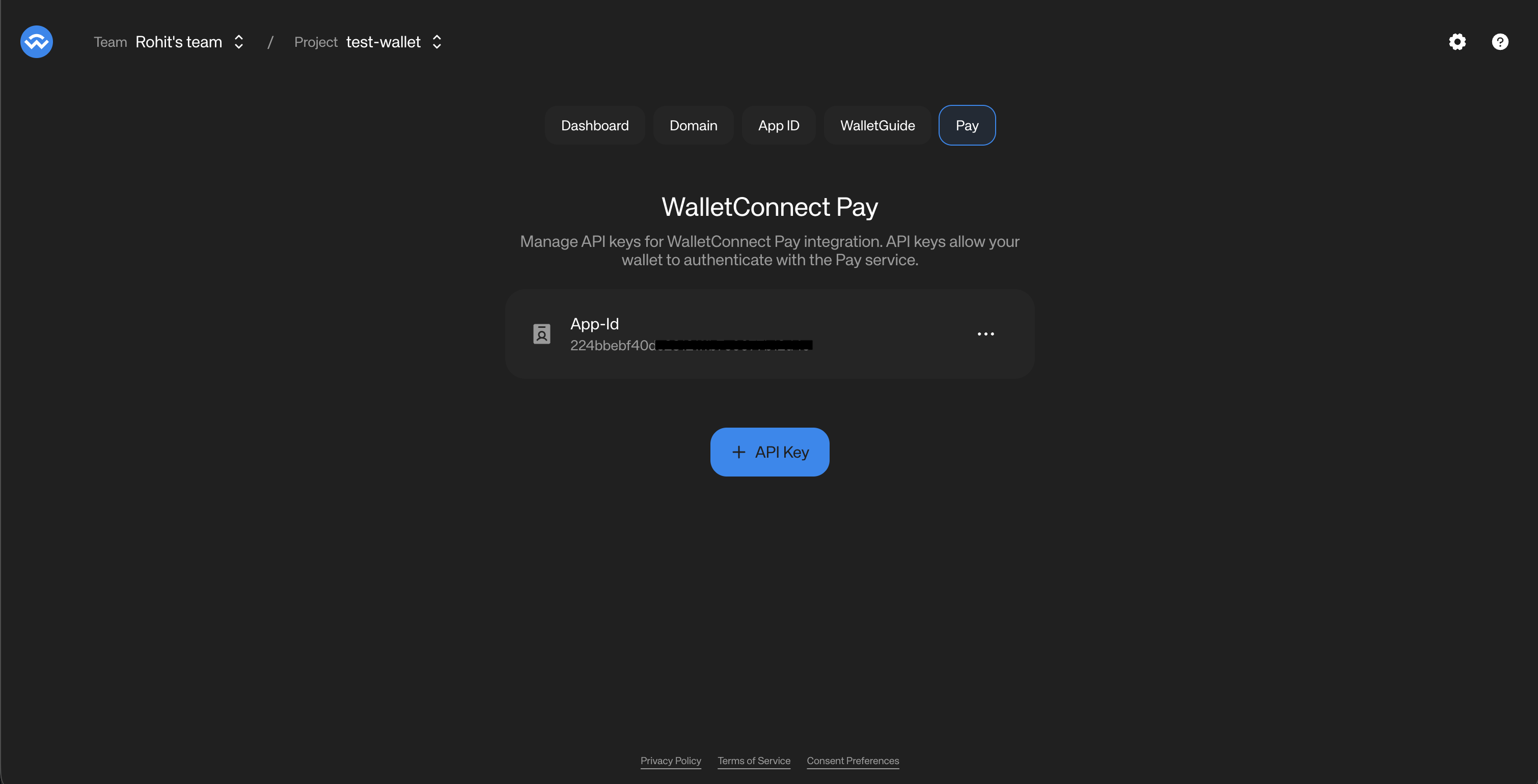
In order to use your WalletConnect Pay, you need to obtain an App ID for your project from the WalletConnect Dashboard.
How to obtain an App ID
- Navigate to the WalletConnect Dashboard.
- Select the project that is associated with your wallet (as in, the projectId that is being used for your wallet’s WalletConnect integration).
- Click on the “Get Started” button to get an App ID associated with your project.
- The Dashboard will now show the App ID associated with your project.
- Click on the three dots on the right of the App ID and select “Copy App ID”. You will be using this for your wallet’s WalletConnect Pay integration.
Installation
First, add the required repositories to your project’s settings.gradle.kts or root build.gradle.kts:
allprojects {
repositories {
mavenCentral()
maven { url = uri("https://jitpack.io") }
}
}
Then add WalletKit to your app’s build.gradle.kts using the BOM (Bill of Materials):
releaseImplementation(platform("com.reown:android-bom:$BOM_VERSION"))
releaseImplementation("com.reown:android-core")
releaseImplementation("com.reown:walletkit")
WalletConnectPay is automatically included as a dependency of WalletKit.
Initialization
WalletConnectPay is automatically initialized when you initialize WalletKit. No additional setup is required.
import com.reown.android.Core
import com.reown.android.CoreClient
import com.reown.walletkit.client.WalletKit
import com.reown.walletkit.client.Wallet
// First, initialize CoreClient in your Application class
val projectId = "" // Get Project ID at https://dashboard.walletconnect.com/
val appMetaData = Core.Model.AppMetaData(
name = "Wallet Name",
description = "Wallet Description",
url = "Wallet URL",
icons = listOf(/* list of icon url strings */),
redirect = "kotlin-wallet-wc:/request" // Custom Redirect URI
)
CoreClient.initialize(
projectId = projectId,
application = this,
metaData = appMetaData,
)
// Then initialize WalletKit
val initParams = Wallet.Params.Init(core = CoreClient)
WalletKit.initialize(initParams) { error ->
// Error will be thrown if there's an issue during initialization
}
The Pay SDK is initialized internally with:
appId from your WalletConnect Project ID
packageName from your application context
Payment Link Detection
Use WalletKit.Pay.isPaymentLink() to determine if a scanned URI is a payment link or a standard WalletConnect pairing URI:
fun handleScannedUri(uri: String, accounts: List<String>) {
if (WalletKit.Pay.isPaymentLink(uri)) {
// Handle as payment - call getPaymentOptions
WalletKit.Pay.getPaymentOptions(uri, accounts)
} else {
// Handle as WalletConnect pairing
WalletKit.pair(Wallet.Params.Pair(uri))
}
}
Payment Flow
The payment flow consists of five main steps:
Detect Payment Link -> Get Options -> Get Actions -> Sign Actions -> Confirm Payment
Get Payment Options
Retrieve available payment options for a payment link:import com.reown.walletkit.client.WalletKit
import com.reown.walletkit.client.Wallet
viewModelScope.launch {
val result = WalletKit.Pay.getPaymentOptions(
paymentLink = "https://pay.walletconnect.com/pay_xxx",
accounts = listOf(
"eip155:1:0xYourAddress", // Ethereum
"eip155:8453:0xYourAddress", // Base
"eip155:10:0xYourAddress", // Optimism
"eip155:137:0xYourAddress", // Polygon
"eip155:42161:0xYourAddress" // Arbitrum
)
)
result.onSuccess { response ->
// Payment metadata
val paymentId = response.paymentId
val paymentInfo = response.info // Merchant info, amount, expiry
// Available payment options
val options = response.options
options.forEach { option ->
println("Option: ${option.id}")
println("Amount: ${option.amount.value} ${option.amount.unit}")
println("Account: ${option.account}")
println("Requires IC: ${option.collectData != null}")
}
}.onFailure { error ->
handleError(error)
}
}
Get Required Actions
Get the wallet RPC actions needed to complete the payment:val actionsResult = WalletKit.Pay.getRequiredPaymentActions(
Wallet.Params.RequiredPaymentActions(
paymentId = paymentId,
optionId = selectedOption.id
)
)
actionsResult.onSuccess { actions ->
actions.forEach { action ->
when (action) {
is Wallet.Model.RequiredAction.WalletRpc -> {
val rpcAction = action.action
// rpcAction.chainId - e.g., "eip155:8453"
// rpcAction.method - e.g., "eth_signTypedData_v4" or "personal_sign"
// rpcAction.params - JSON string with signing parameters
}
}
}
}.onFailure { error ->
handleError(error)
}
Sign Actions
Sign each required action using your wallet’s signing implementation:val signatures = actions.map { action ->
when (action) {
is Wallet.Model.RequiredAction.WalletRpc -> {
val rpc = action.action
when (rpc.method) {
"eth_signTypedData_v4" -> signTypedDataV4(rpc.params)
"personal_sign" -> personalSign(rpc.params)
else -> throw UnsupportedOperationException("Unsupported: ${rpc.method}")
}
}
}
}
Signing eth_signTypedData_v4
import org.json.JSONArray
import org.web3j.crypto.ECKeyPair
import org.web3j.crypto.Sign
import org.web3j.crypto.StructuredDataEncoder
fun signTypedDataV4(params: String): String {
// params is a JSON array: [address, typedData]
val paramsArray = JSONArray(params)
val requestedAddress = paramsArray.getString(0)
val typedData = paramsArray.getString(1)
// Use StructuredDataEncoder for proper EIP-712 hashing
val encoder = StructuredDataEncoder(typedData)
val hash = encoder.hashStructuredData()
val keyPair = ECKeyPair.create(privateKeyBytes)
val signatureData = Sign.signMessage(hash, keyPair, false)
val rHex = signatureData.r.bytesToHex()
val sHex = signatureData.s.bytesToHex()
val v = signatureData.v[0].toInt() and 0xff
val vHex = v.toString(16).padStart(2, '0')
return "0x$rHex$sHex$vHex".lowercase()
}
Signatures must be in the same order as the actions array.
Collect User Data (If Required)
Some payments require additional user information:WebView-Based Data Collection
When a payment requires user information (e.g., for Travel Rule compliance), the SDK returns a collectData field on individual payment options. Each option may independently require data collection — some options may require it while others don’t.Recommended Flow (Per-Option)
The recommended approach is to display all payment options upfront, then handle data collection only when the user selects an option that requires it:
- Call
getPaymentOptions and display all available options to the user
- Show a visual indicator (e.g., “Info required” badge) on options where
option.collectData is present
- When the user selects an option, check
selectedOption.collectData
- If present, open
selectedOption.collectData.url in a WebView within your wallet
- Optionally append a
prefill=<base64-json> query parameter with known user data (e.g., name, date of birth, address). Use proper URL building to handle existing query parameters.
- Listen for JS bridge messages:
IC_COMPLETE (success) or IC_ERROR (failure)
- On
IC_COMPLETE, proceed to confirmPayment() without passing collectedData — the WebView submits data directly to the backend
Decision Matrix
Response collectData | option.collectData | Behavior |
|---|
| present | present | Option requires IC — use option.collectData.url |
| present | null | Option does NOT require IC (others might) — skip IC for this option |
null | null | No IC needed for any option |
The collectData also includes a schema field — a JSON schema string describing the required fields. The required list in this schema tells you which fields the form expects. Wallets can use these field names as keys when building the prefill JSON object. For example, if the schema’s required array contains ["fullName", "dob", "pobAddress"], you can prefill with {"fullName": "...", "dob": "...", "pobAddress": "..."}.
The top-level collectData on the payment options response is still available for backward compatibility. However, the per-option collectData is the recommended approach as it provides more granular control over the flow.
When using the WebView approach, do not pass collectedData to confirmPayment(). The WebView handles data submission directly.
// Check per-option data collection requirement after user selects an option
selectedOption.collectData?.let { collectAction ->
val url = collectAction.url
if (url != null) {
// Build prefill URL with known user data
// Use the "required" list from collectAction.schema to determine which fields to prefill
val prefillJson = JSONObject().apply {
put("fullName", "John Doe")
put("dob", "1990-01-15")
put("pobAddress", "123 Main St, New York, NY 10001")
}.toString()
val prefillBase64 = Base64.encodeToString(
prefillJson.toByteArray(),
Base64.NO_WRAP or Base64.URL_SAFE
)
val webViewUrl = Uri.parse(url).buildUpon()
.appendQueryParameter("prefill", prefillBase64)
.build().toString()
// Show WebView for this specific option and wait for IC_COMPLETE message
showWebView(webViewUrl)
}
}
WebView Message Types
The WebView communicates with your wallet through JavaScript bridge messages. The message payload is a JSON string with the following structure:| Message Type | Payload | Description |
|---|
IC_COMPLETE | { "type": "IC_COMPLETE", "success": true } | User completed the form successfully. Proceed to payment confirmation. |
IC_ERROR | { "type": "IC_ERROR", "error": "..." } | An error occurred. Display the error message and allow the user to retry. |
| Platform | Bridge Name | Handler |
|---|
| Kotlin (Android) | AndroidWallet | @JavascriptInterface onDataCollectionComplete(json: String) |
| Swift (iOS) | payDataCollectionComplete | WKScriptMessageHandler.didReceive(message:) |
| Flutter | ReactNativeWebView (injected via JS bridge) | JavaScriptChannel.onMessageReceived |
| React Native | ReactNativeWebView (native) | WebView.onMessage prop |
Confirm Payment
Submit signatures and finalize the payment:val confirmResult = WalletKit.Pay.confirmPayment(
Wallet.Params.ConfirmPayment(
paymentId = paymentId,
optionId = selectedOption.id,
signatures = signatures,
collectedData = collectedData // Optional
)
)
confirmResult.onSuccess { response ->
when (response.status) {
Wallet.Model.PaymentStatus.SUCCEEDED -> {
// Payment completed successfully
}
Wallet.Model.PaymentStatus.PROCESSING -> {
// Payment is being processed
}
Wallet.Model.PaymentStatus.FAILED -> {
// Payment failed
}
Wallet.Model.PaymentStatus.EXPIRED -> {
// Payment expired
}
Wallet.Model.PaymentStatus.REQUIRES_ACTION -> {
// Additional action required
}
}
}.onFailure { error ->
handleError(error)
}
WebView Implementation
When a selected option has collectData.url present, display the URL in a WebView. The WebView handles form rendering, validation, and T&C acceptance.
import android.webkit.JavascriptInterface
import android.webkit.WebView
import android.webkit.WebViewClient
import android.webkit.WebResourceRequest
import android.content.Intent
import android.net.Uri
import android.util.Base64
import androidx.compose.runtime.Composable
import androidx.compose.ui.viewinterop.AndroidView
import org.json.JSONObject
@Composable
fun PayDataCollectionWebView(
url: String,
onComplete: () -> Unit,
onError: (String) -> Unit
) {
AndroidView(factory = { context ->
WebView(context).apply {
settings.javaScriptEnabled = true
settings.domStorageEnabled = true
settings.allowFileAccess = false
addJavascriptInterface(
object {
@JavascriptInterface
fun onDataCollectionComplete(json: String) {
val message = JSONObject(json)
when (message.optString("type")) {
"IC_COMPLETE" -> onComplete()
"IC_ERROR" -> onError(
message.optString("error", "Unknown error")
)
}
}
},
"AndroidWallet"
)
webViewClient = object : WebViewClient() {
override fun shouldOverrideUrlLoading(
view: WebView?,
request: WebResourceRequest?
): Boolean {
val requestUrl = request?.url?.toString() ?: return false
if (!requestUrl.contains("pay.walletconnect.com")) {
context.startActivity(Intent(Intent.ACTION_VIEW, Uri.parse(requestUrl)))
return true
}
return false
}
}
loadUrl(url)
}
})
}
Complete Example
Here’s a complete implementation example:
import com.reown.walletkit.client.WalletKit
import com.reown.walletkit.client.Wallet
import kotlinx.coroutines.launch
class PaymentViewModel : ViewModel() {
fun handleScannedUri(uri: String) {
if (WalletKit.Pay.isPaymentLink(uri)) {
processPayment(uri)
} else {
// Handle as WalletConnect pairing
WalletKit.pair(Wallet.Params.Pair(uri))
}
}
fun processPayment(paymentLink: String) {
viewModelScope.launch {
val walletAddress = "0xYourAddress"
// Step 1: Get payment options
val optionsResult = WalletKit.Pay.getPaymentOptions(
paymentLink = paymentLink,
accounts = listOf(
"eip155:1:$walletAddress",
"eip155:8453:$walletAddress",
"eip155:10:$walletAddress"
)
)
optionsResult.onSuccess { response ->
val paymentId = response.paymentId
val selectedOption = response.options.first()
// Step 2: Get required actions
val actionsResult = WalletKit.Pay.getRequiredPaymentActions(
Wallet.Params.RequiredPaymentActions(
paymentId = paymentId,
optionId = selectedOption.id
)
)
actionsResult.onSuccess { actions ->
// Step 3: Sign actions
val signatures = signActions(actions)
// Step 4: Collect data via WebView if required for selected option
selectedOption.collectData?.url?.let { webViewUrl ->
showDataCollectionWebView(webViewUrl)
return@launch
}
// Step 5: Confirm payment
val confirmResult = WalletKit.Pay.confirmPayment(
Wallet.Params.ConfirmPayment(
paymentId = paymentId,
optionId = selectedOption.id,
signatures = signatures
)
)
confirmResult.onSuccess { confirmation ->
handlePaymentStatus(confirmation.status)
}.onFailure { error ->
handleError(error)
}
}.onFailure { error ->
handleError(error)
}
}.onFailure { error ->
handleError(error)
}
}
}
private suspend fun signActions(
actions: List<Wallet.Model.RequiredAction>
): List<String> {
return actions.map { action ->
when (action) {
is Wallet.Model.RequiredAction.WalletRpc -> {
signWithWallet(action.action)
}
}
}
}
private fun handlePaymentStatus(status: Wallet.Model.PaymentStatus) {
when (status) {
Wallet.Model.PaymentStatus.SUCCEEDED -> showSuccess()
Wallet.Model.PaymentStatus.PROCESSING -> showProcessing()
Wallet.Model.PaymentStatus.FAILED -> showFailure()
Wallet.Model.PaymentStatus.EXPIRED -> showExpired()
Wallet.Model.PaymentStatus.REQUIRES_ACTION -> { /* Handle */ }
}
}
}
API Reference
WalletKit.Pay
The payment operations object within WalletKit.
Methods
| Method | Description |
|---|
isPaymentLink(uri: String): Boolean | Check if URI is a payment link |
getPaymentOptions(paymentLink, accounts) | Get available payment options |
getRequiredPaymentActions(params) | Get actions requiring signatures |
confirmPayment(params) | Confirm and finalize payment |
Parameters
Wallet.Params.RequiredPaymentActions
data class RequiredPaymentActions(
val paymentId: String,
val optionId: String
)
Wallet.Params.ConfirmPayment
data class ConfirmPayment(
val paymentId: String,
val optionId: String,
val signatures: List<String>
)
Data Models
Wallet.Model.PaymentOptionsResponse
data class PaymentOptionsResponse(
val paymentId: String,
val info: PaymentInfo?,
val options: List<PaymentOption>,
val collectDataAction: CollectDataAction?,
val resultInfo: PaymentResultInfo? // Transaction result details (present when payment already completed)
)
data class PaymentResultInfo(
val txId: String, // Transaction ID
val optionAmount: PaymentAmount // Token amount details
)
Wallet.Model.PaymentInfo
data class PaymentInfo(
val status: PaymentStatus,
val amount: PaymentAmount,
val expiresAt: Long,
val merchant: MerchantInfo
)
data class MerchantInfo(
val name: String,
val iconUrl: String?
)
Wallet.Model.PaymentOption
data class PaymentOption(
val id: String,
val amount: PaymentAmount,
val account: String,
val estimatedTxs: Int?,
val collectData: CollectDataAction? // Per-option data collection (null if not required)
)
Wallet.Model.PaymentAmount
data class PaymentAmount(
val value: String,
val unit: String,
val display: PaymentAmountDisplay?
)
data class PaymentAmountDisplay(
val assetSymbol: String,
val assetName: String,
val decimals: Int,
val iconUrl: String?,
val networkName: String?,
val networkIconUrl: String?
)
Wallet.Model.WalletRpcAction
data class WalletRpcAction(
val chainId: String, // CAIP-2 chain ID (e.g., "eip155:8453")
val method: String, // RPC method
val params: String // JSON-encoded parameters
)
Wallet.Model.CollectDataAction
data class CollectDataAction(
val url: String, // WebView URL for data collection
val schema: String? // JSON schema describing required fields
)
Wallet.Model.ConfirmPaymentResponse
data class ConfirmPaymentResponse(
val status: PaymentStatus,
val isFinal: Boolean,
val pollInMs: Long?
)
Wallet.Model.PaymentStatus
| Status | Description |
|---|
REQUIRES_ACTION | Additional action needed |
PROCESSING | Payment in progress |
SUCCEEDED | Payment completed |
FAILED | Payment failed |
EXPIRED | Payment expired |
Best Practices
-
Use WalletKit Integration: If your wallet already uses WalletKit, prefer this approach for automatic configuration
-
Use
isPaymentLink() for Detection: Use the utility method instead of manual URL parsing for reliable payment link detection
-
Account Format: Always use CAIP-10 format for accounts:
eip155:{chainId}:{address}
-
Multiple Chains: Provide accounts for all supported chains to maximize payment options
-
Signature Order: Maintain the same order of signatures as the actions array
-
Error Handling: Always handle errors gracefully and show appropriate user feedback
-
Loading States: Show loading indicators during API calls and signing operations
-
Expiration: Check
paymentInfo.expiresAt and warn users if time is running low
-
User Data: Only collect data when
collectData is present on the selected payment option and you don’t already have the required user data. If you already have the required data, you can submit this without collecting from the user. You must make sure the user accepts WalletConnect Terms and Conditions and Privacy Policy before submitting user information to WalletConnect.
-
WebView Data Collection: When
selectedOption.collectData?.url is present, display the URL in a WebView rather than building native forms. The WebView handles form rendering, validation, and T&C acceptance.
-
Per-Option Data Collection: When displaying payment options, check each option’s
collectData field. Show a visual indicator (e.g., “Info required” badge) on options that require data collection. Only open the WebView when the user selects an option with collectData present — use the option’s collectData.url which is already scoped to that option’s account.